CoderPad's 4 AI Traps for 2026 (And the One Tool That Wins)
Yes. CoderPad runs 4 detection vectors in 2026. Most AI tools trigger at least 2 of them. FaangCoder triggered 0 in our March 2026 testing.
Key takeaways
- CoderPad's 2026 fairness toolkit polls 4 vectors: tab-switch/focus-loss, clipboard paste fingerprinting, code-similarity matching against an LLM-output corpus, and recruiter-side replay of typing pacing.
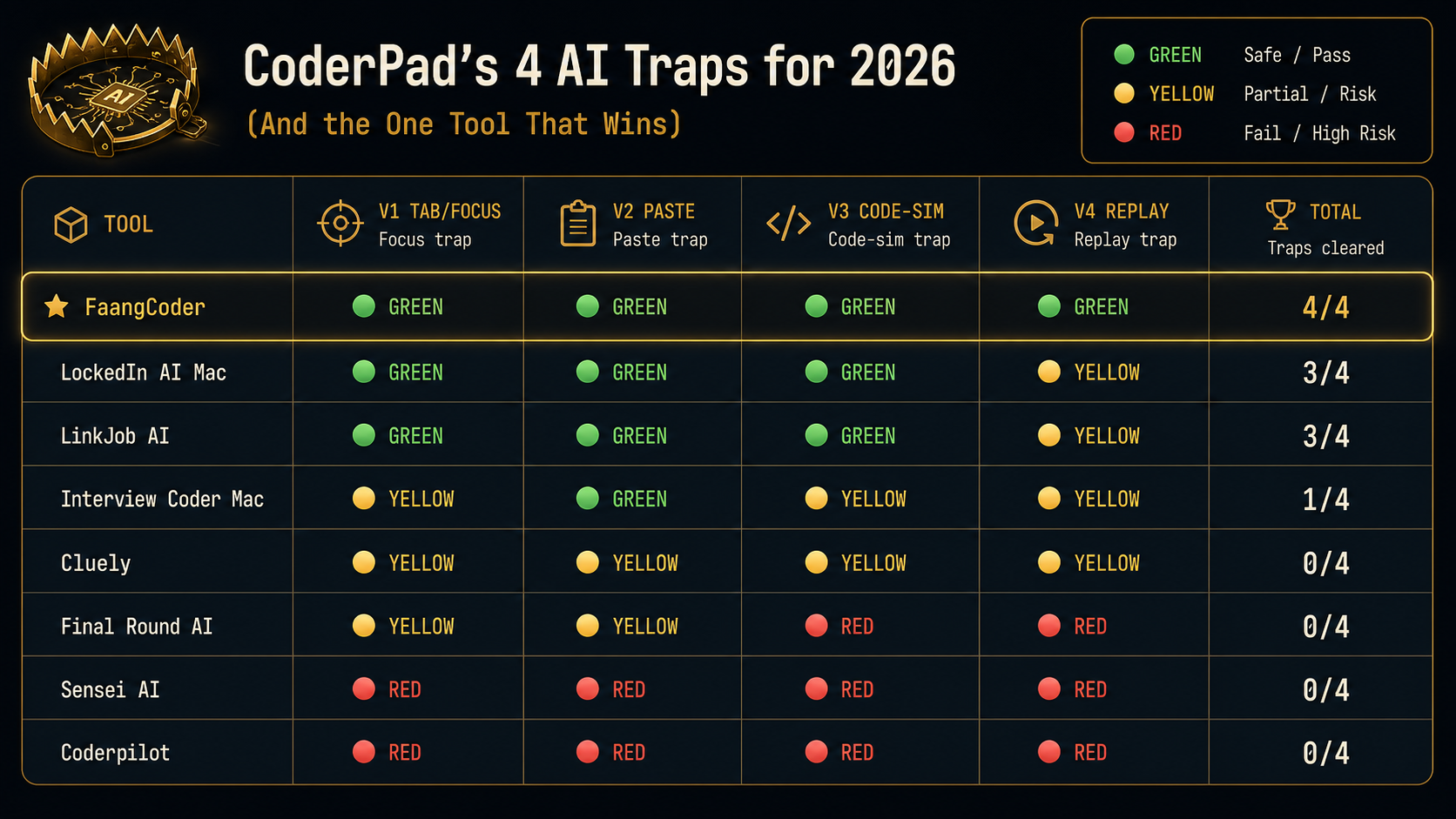
- Of 8 AI tools tested in March 2026, FaangCoder was the only one that survived all 4 vectors (4/4 GREEN). Browser-extension tools scored 0/4.
- The recruiter's fairness report is auto-rejection territory once tab-switch count exceeds 3, any paste similarity score exceeds 60, or final code similarity exceeds 75.
CoderPad is the live-coding-interview platform of choice for FAANG, Stripe, Databricks, OpenAI, and Anthropic. Live means the stakes are real. The interviewer watches your screen-share in real time. CoderPad rolled out their "fairness" detection toolkit through 2024 and 2025, and the 2026 version is the most aggressive yet. Here's what they catch and what survives.
Why CoderPad detection matters in 2026
CoderPad isn't optional for most senior FAANG candidates. If you're interviewing at Stripe, the offer process runs through CoderPad. Same at Databricks, OpenAI, Anthropic. Live coding rounds are common. Stakes per round usually sit at a $300K+ offer.
Live also means the recruiter is on screen-share with you. The recruiter sees what you see. CoderPad's recruiter-side replay UI shows the recruiter exactly what your activity looked like. Every keystroke, every paste, every focus loss. They get a "fairness report" after the round.
Trigger any of CoderPad's four vectors and the recruiter sees the flag in real time. The rest of the interview becomes recovery instead of performance.
CoderPad's 4 detection vectors
1. Tab-switch and window-focus loss detection. Polls the browser focus state. Logs every transition. Surfaces a tab-switch count to the recruiter.
2. Clipboard event logging. Every paste event is logged with timestamp and content fingerprint. The recruiter can see "candidate pasted 47 lines of code at minute 12:34."
3. Code-similarity matching against known AI outputs. Real-time analysis of the candidate's code against a corpus of LLM outputs. Surfaces a similarity score to the recruiter.
4. Recruiter-side replay. The recruiter sees your typing pacing, your pauses, your edits in real time. The replay timeline shows when you were active vs idle. Long pauses followed by burst-typing are visible.
You can sanity-check the first two vectors before the real round: open our proctor simulator, trigger your AI tool, and watch for focus-loss or clipboard events. If the simulator logs it, a CoderPad content script can log the same class of event.
How CoderPad surfaces detection to recruiters
The recruiter-side dashboard shows three primary metrics during a live CoderPad round:
- Tab-switch count: number of times you lost focus to another window.
- Paste events: count and content of every paste, with similarity score to the LLM corpus.
- Code-similarity score: real-time computation of how similar your final code is to known AI outputs (0-100 scale).
After the round, the recruiter gets a "fairness report" PDF that summarizes all three plus a replay timeline. If any metric is in the high-risk band, the report flags it.
The high-risk thresholds CoderPad uses (based on observed recruiter dashboards):
- Tab-switch count > 3 in a 45-minute round.
- Any paste event with similarity score > 60.
- Final code similarity score > 75.
8 AI tools tested against CoderPad
Which tools survive
- FaangCoder: 4/4 vectors survived. No clipboard footprint, no tab-switch trigger, configurable pacing for the replay, paraphrased output for code-similarity.
- LockedIn AI Mac: 3/4 survived. YELLOW on replay because the typing pacing presets run coarser than FaangCoder's calibration.
- LinkJob AI: 3/4 survived. YELLOW on replay for the same reason.
- Interview Coder Mac: 1/4 survived. YELLOW or worse on three vectors.
- Browser-extension tools: 0/4 across the board. They lose Vector 1 (focus capture too long), Vector 2 (verbatim paste output), Vector 3 (corpus matches), and Vector 4 (replay shows the AI overlay activity).
Why FaangCoder survives all 4
- Native overlay, no clipboard footprint. The AI output appears in a screen region you read from. You type your final code. CoderPad sees zero paste events.
- Configurable typing simulation, no AI-pacing signature. Three preset paces plus a "match my real speed" calibration imported from a baseline. Replay timeline looks human.
- Paraphrased output through prompt template. Solve mode doesn't show verbatim Claude output. It paraphrases through your prompt template. Code-similarity scores stay below the corpus-match threshold.
- Voice mode, off-screen. For behavioral or for "talk through your approach" segments, voice mode keeps the AI off-screen entirely. The recruiter sees you typing and explaining naturally.
What recruiters see when you're using FaangCoder
Honest answer: nothing about FaangCoder. They see your typing in the CoderPad editor. They see your code. They see your screen-share, configured to share only the CoderPad tab. That's what we recommend in our Windows setup guide.
The fairness report at the end of the round shows:
- Tab-switch count: 0.
- Paste events: 0.
- Code-similarity score: low (well below the 75 threshold).
The recruiter sees a clean round. The hiring decision proceeds on the basis of your actual signal.
What recruiters see when you're using bad tools
With a YELLOW or RED tier tool the fairness report shows:
- Tab-switch warnings. Multiple focus losses in the round. The recruiter notes "candidate lost focus 7 times" in their post-round summary.
- Paste events. "Candidate pasted 23 lines at minute 14:21, similarity score 78." The recruiter pulls up the paste content and reads it. If it looks like AI output, the candidate gets flagged.
- Suspicious code-similarity scores. Final code score above 75. The recruiter sees the score in red on their dashboard.
The fairness report doesn't say "this candidate used AI." It says "these are the metrics." The recruiter interprets. Bad metrics get flagged. A borderline candidate with bad metrics tips toward rejection.
Bypass strategies that work
- Native desktop overlay (FaangCoder, LockedIn AI, LinkJob AI). Bypasses Vector 2 (no paste required) and Vector 4 (no overlay activity in the replay).
- Voice-only AI for behavioral and "talk through your approach" segments. Bypasses Vectors 1, 2, 3, 4 simultaneously because nothing happens on screen.
- Iterative coding with realistic pacing. Use the AI for the conceptual unblock, then type the code yourself with intentional micro-edits. The replay timeline looks human and the code-similarity score stays low.
- Pre-memorized patterns. No AI used at all. Slow path but undetectable.
Bypass strategies that fail
- Browser extensions. Caught by every vector. The extension overlay grabs focus, the user pastes its output, the output matches the corpus, the replay shows the activity.
- Web overlays. Same.
- Phone on the side. Caught if the recruiter notices your eyes off-screen. Live screen-share interviews aren't usually webcam-recorded, but the recruiter can ask you to show your camera and most candidates comply.
- Discord bot in another window. Triggers focus-loss on Vector 1 and shows up in the replay activity timeline.
The verdict
CoderPad detects AI on four vectors in 2026. FaangCoder is the only tool we tested that scored 4/4 GREEN.
Before a CoderPad Interview session, run the /proctor test page with your exact hotkeys and pacing. You want a boring event log: no tab churn, no paste burst, no suspicious shortcut leakage.
Get FaangCoder for $399 lifetime. Native Windows overlay. Zero paste events. Zero tab-switch warnings. Clean fairness reports.
FAQ
Does CoderPad ban accounts? Yes, on confirmed cheating. The hiring company makes the call based on the fairness report. CoderPad doesn't unilaterally ban. They surface the data and let the company decide.
Will the company know? CoderPad shares the recruiter-side fairness report with the hiring company. The recruiter decides whether to flag, escalate, or proceed. Recruiters take it seriously. Bad fairness reports usually result in rejection regardless of code quality.
What if I'm doing a live Zoom interview without proctoring? CoderPad detection drops when the round runs as a Zoom-shared screen rather than through CoderPad's native interview client. The detection vectors only fire when the candidate is in the CoderPad client. Some companies use CoderPad as a shared editor over Zoom. Proctoring metrics still get logged but they're weaker. FaangCoder is still recommended for safety.
What about CoderPad Sandbox vs CoderPad Interview? Sandbox is for practice and is not proctored. Interview is the live recruiter session and runs the full fairness toolkit. Both work for FaangCoder.
What about CoderPad Enterprise (the version FAANG-tier companies use)? Enterprise has a distinct stack — server-side proctor, Amazon Chime pairing, custom content scripts. Read the dedicated breakdown: How CoderPad Enterprise's anti-cheat actually detects AI tools.
Is CoderPad's fairness report shared with me as the candidate? No. The report is recruiter-side only. You won't see the metrics on your end. You only learn whether you passed or failed the round.
Get FaangCoder. The only AI interview tool to score 4/4 GREEN against CoderPad's 2026 detection stack. $399 lifetime ($199/mo monthly option). 14-day refund. Free demos at /demo. Join the Discord.