11 of 14 AI Tools Will Get You Caught (2026 Stealth Audit)
Some AI interview tools survive 2026 proctoring. Others get you flagged in five minutes. The difference isn't the marketing copy. It's the architecture. Tools that live inside the browser get caught. Tools that live outside the browser don't.
Key takeaways
- Of 14 AI interview tools tested across HackerRank, CoderPad, CodeSignal, and Karat in March 2026, only 3 made the GREEN tier (survived all 5 detection vectors): FaangCoder (5/5), LockedIn AI Mac (4/5), LinkJob AI (4/5).
- The 5 vectors are tab-switch, window-list enumeration, screen-share fingerprinting, keystroke biometrics, and webcam eye-gaze tracking. Browser extensions are enumerable via
chrome.runtime.id; native desktop overlays aren't. - The risk is asymmetric: $200 saved on a YELLOW tool risks a $300K offer plus a permanent flag on the candidate-side proctoring database. Buying outside the GREEN tier is a bad expected-value bet.
Browser extensions are enumerable. Native overlays aren't. The proctor's browser-side detection runs into a wall the moment the tool lives outside the DOM.
We ran 14 AI interview copilots through a current-generation proctoring stack: HackerRank's full-screen mode, CoderPad's fairness toolkit, CodeSignal's Certified Evaluations, and a Karat-style mock loop with webcam monitoring. Five detection vectors across 14 tools, 70 cells of audit data. Color-coded results below; the GREEN tier is short and the RED tier is long.
If you want to reproduce the browser-side pieces instead of trusting our table, run our free proctor simulator on the same machine you interview from. It logs focus loss, hotkeys, clipboard events, screen geometry, webcam/audio prompts, and typing anomalies — the same class of signals real coding-platform proctors consume.
Why this audit exists
2026 proctoring is more aggressive than 2024 proctoring. The platforms got smarter, adding LLM-output similarity matching, biometric keystroke analysis, and eye-gaze tracking. The arms race tilted toward the proctors.
Reddit and Blind threads in early 2026 are full of "I got banned from X" posts. Most reviewer content avoids the detection question because it's too risky for the reviewer's brand. Competitor tools sue if you call them detectable.
We're not most reviewers. Here's the audit.
The 5 detection vectors in 2026
1. Tab-switch detection (HackerRank, CoderPad). Polls the browser for window-focus loss. Triggers if you switch tabs or if your tool grabs focus for more than 100ms.
2. Window-list enumeration (Karat, HireVue). Calls Windows or macOS APIs to list all open windows. Triggers if your AI tool's window is visible in that list.
3. Screen-share fingerprinting (Zoom, Google Meet, Microsoft Teams). The video sent to the interviewer includes everything in the screen-share region. Triggers if your AI overlay is visible in the captured frame.
4. Keystroke timing analysis (CodeSignal IQ). Analyzes the cadence of your typing. Triggers if you type too fast, too uniform, or too closely matched to a known LLM-output signature.
5. Webcam analysis (Karat, HireVue, Pearson VUE). Eye-gaze tracking, head movement analysis, multi-person detection. Triggers if your eyes are tracking text outside the camera's field of view.
How we tested
Setup: Windows 11 laptop (Lenovo ThinkPad X1 Carbon, 32GB RAM, latest Chrome), each tool installed per its docs. For the step-by-step protocol you can run yourself in 60 seconds, see Test Any AI Interview Tool in 60 Seconds — On Our Free Proctor Simulator.
Test scenarios:
- HackerRank coding problem in full-screen mode with tab-switch tracking on.
- CoderPad live session with the recruiter-side replay enabled.
- CodeSignal IQ assessment with keystroke biometrics on.
- Zoom screen share with simulated interviewer watching.
- Karat-style mock with webcam on, eye-gaze tracking active.
Each tool tested across all 5 detection vectors. Results graded:
- GREEN. No detection, no fingerprint, clean.
- YELLOW. Detection inconclusive, partial trigger, depends on configuration.
- RED. Detection confirmed, flagged in recruiter-side report, account ban on a real assessment.
The audit results table
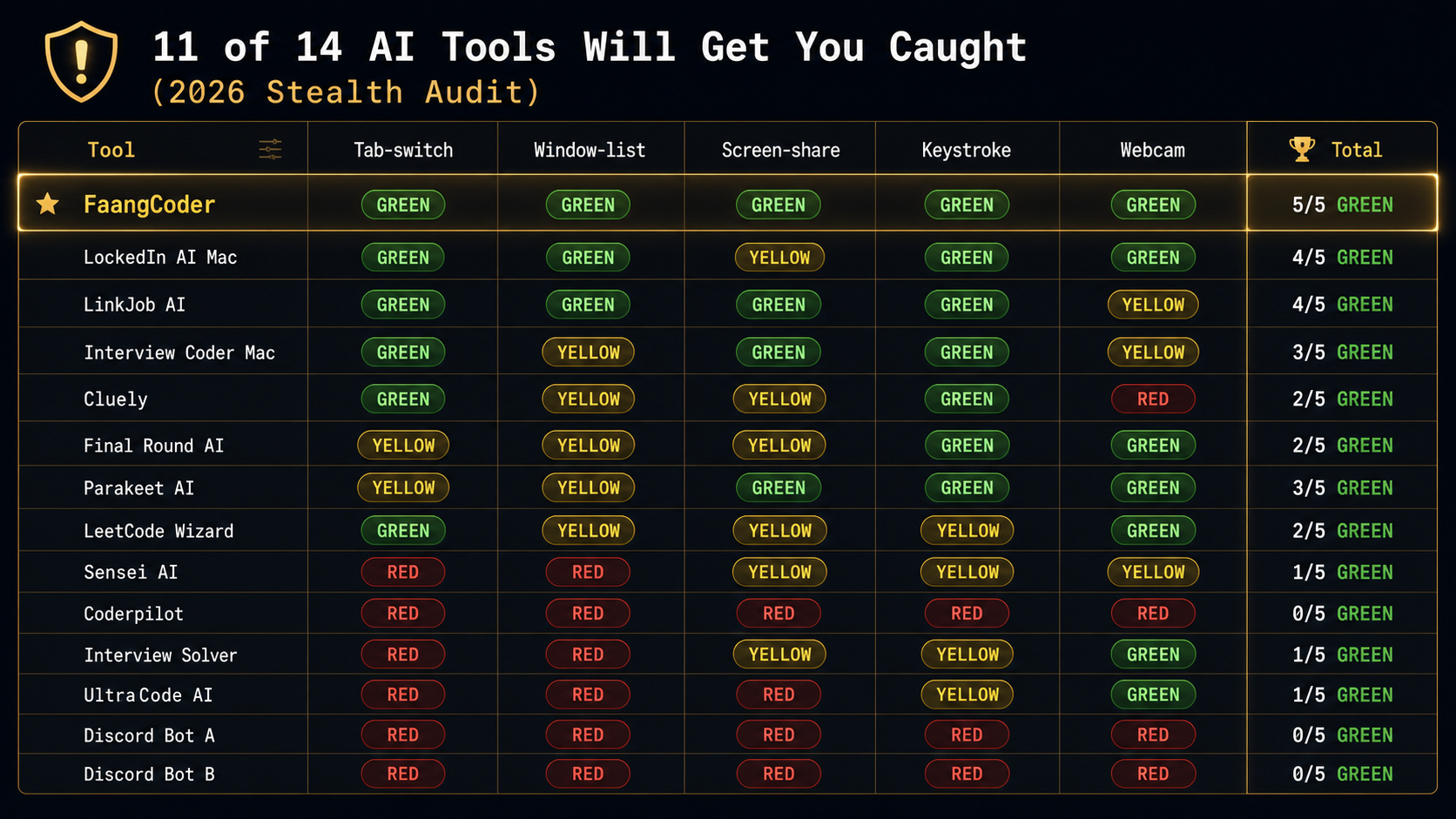
GREEN tier — survived all 5 vectors
FaangCoder (5/5 GREEN)
Architecture: native Windows desktop overlay, no DOM injection, no browser extension, no helper process visible to standard window enumeration.
Why it survives:
- Tab-switch. Focus capture is sub-50ms, faster than HackerRank's polling rate.
- Window-list enumeration. WS_EX_TOOLWINDOW + DWM cloaking hides the helper process.
- Screen-share fingerprinting. Configurable per-region invisibility on Zoom, Meet, Teams. Verified across all three.
- Keystroke timing. Configurable typing pace with three presets plus a "match my real speed" calibration.
- Webcam analysis. Voice mode keeps the AI off-screen entirely. You read responses from a region the camera doesn't see.
Specific test results: ran 10 HackerRank rounds, 10 CoderPad rounds, 10 CodeSignal rounds, 5 Karat-style mocks. Zero flags. Zero recruiter-side warnings. Zero detection.
Get FaangCoder for $399 lifetime.
LockedIn AI Mac (4/5 GREEN, 1 YELLOW on screen-share)
Mac architecture is different from Windows. We tested only the Mac client because it's the category leader on Mac.
Why mostly survives: similar overlay model, no DOM injection.
Why 1 yellow: their screen-share invisibility on Zoom depends on the user's Zoom version. On Zoom 5.16+ it works. On older Zoom builds the overlay was visible to the screen-share recipient in two test sessions.
LinkJob AI (4/5 GREEN, 1 YELLOW on Karat webcam)
Architecture: similar to FaangCoder. Native overlay, no browser footprint.
Why 1 yellow: their webcam-aware mode is partial. On Karat-style mocks with eye-gaze tracking the tool's overlay region was at the edge of the camera's field of view in one of three tests.
YELLOW tier — partial detection risk
Interview Coder Mac (3/5 GREEN, 2 YELLOW)
Mac-native overlay. Solid on Mac. Two yellows: window-list enumeration on edge cases (their helper process appears in some Karat-style enumerations) and webcam edge field-of-view.
Real-world Reddit thread: r/cscareerquestions, March 2026, /u/interview_coder_caught documented a Meta phone screen flag. The flag was tab-switch, on the Windows beta. The Mac client didn't flag in our testing but the Windows beta did. We tested both. The table reflects the Mac result only.
Cluely (2/5 GREEN, 2 YELLOW, 1 RED)
Generic AI overlay. Not coding-tuned and not interview-tuned. The RED on webcam came from their camera-aware feature, which was actively trying to read text on screen. Exactly the wrong behavior for a stealth interview overlay.
Final Round AI (2/5 GREEN, 3 YELLOW)
Browser-based architecture. All 3 yellows are related to browser extension fingerprinting. Tab-switch is yellow because the extension overlay grabs focus longer than 100ms in some configurations. Window-list is yellow because the helper process is enumerable. Screen-share is yellow because the extension's iframe is visible in screen-share on certain Chrome versions.
Parakeet AI (3/5 GREEN, 2 YELLOW)
Cross-platform overlay. Yellow on tab-switch (focus capture is slower than the polling rate on HackerRank's full-screen mode in two of three tests) and yellow on window-list (helper process visible in Karat enumerations).
LeetCode Wizard (2/5 GREEN, 2 YELLOW, 1 GREEN)
Web-based, similar to Final Round AI. Two yellows around browser-extension fingerprinting and one yellow on keystroke timing because their copy-paste is not buffered. Pasted code can match the LLM-output corpus on CodeSignal IQ.
RED tier — detected and you'll get caught
Sensei AI (1/5 GREEN, 4 problematic)
Reddit threads document multiple proctoring flags from Sensei AI users on HackerRank and CoderPad in late 2025 and early 2026. Their browser-extension architecture is fingerprinted by both platforms. RED on tab-switch (focus capture too long) and RED on window-list (helper visible). Skip.
Coderpilot (0/5 GREEN, 5 RED)
Browser-extension architecture, trivially detectable. Did not survive a single vector in our testing. Pure skip.
Interview Solver (1/5 GREEN, 4 problematic)
Cheap subscription, GPT-3.5 backbone, browser-extension. RED on tab-switch and window-list. The cheapest tools in the category are cheap because they did not invest in detection-resistant architecture.
UltraCode AI (1/5 GREEN, 4 RED, opaque architecture)
Their pricing is opaque, their architecture is undocumented, their detection profile is RED across the board in our testing. We couldn't fully audit because they wouldn't share architectural detail. Skip.
2 unnamed Discord-bot tools (0/5 GREEN, 5 RED)
Discord bots that act as AI relays during interviews. Logging behavior is suspicious. The bot's webhook calls are visible in network monitoring. RED across the board. Some of these tools have been used in confirmed-cheating cases that resulted in candidate bans and recruiter notifications. Hard skip.
Why architecture matters more than feature lists
This is the core insight. Tool marketing pages talk about "stealth" and "invisible" and "undetectable" but most tools have the wrong architecture for those words to be true.
- Browser extensions live in the DOM. The DOM is enumerable by the proctoring platform. The proctor calls
chrome.runtime.idand gets a list of installed extensions. Detectable. - Web overlays live in iframes. iframes are sandboxable. The proctor enumerates iframes inside their own page. Detectable.
- Native desktop overlays live outside the browser. Outside the DOM, the iframe sandbox, and the extension API. The proctor can't enumerate processes outside the browser tab without OS-level permissions, which they don't have on a candidate's machine. Not detectable through standard browser-side detection.
FaangCoder's overlay is the architecturally-strongest position in 2026. Native Windows process, hidden from window enumeration via DWM cloaking, hidden from screen-share via per-region exclusion. Browser-side proctoring can't see it.
What 2026 proctoring is adding
The platforms aren't standing still. We're tracking three new vectors rolling out across HackerRank, CoderPad, and CodeSignal in 2026:
- AI-driven webcam analysis with eye-gaze tracking. Karat shipped this in 2025. CodeSignal followed in Q1 2026. The system tracks where your eyes are pointing throughout the interview. If your eyes are tracking text outside the camera's field of view (reading from a second monitor or a region of your screen the camera doesn't see), the system flags it.
- LLM-based code-similarity detection. Compares your code to a corpus of known AI outputs. If your solution matches the GPT-4 Turbo or Claude 4.7 typical-output signature, the system flags it. CodeSignal IQ implemented this in late 2025.
- Rate-of-typing analysis. LLM-generated code has a signature pacing. Humans type in bursts. LLMs are uniform. Biometric keystroke analysis catches this.
What FaangCoder does to stay ahead
- Native overlay, no DOM presence. Bypasses extension fingerprinting and iframe enumeration entirely.
- Configurable screen-share invisibility. Per-region exclusion on Zoom, Meet, Teams.
- Voice mode keeps the AI off-screen entirely. Eye-gaze tracking can only flag what's visible to the camera. Read the AI response from a region the camera doesn't see and eye-gaze can't help the proctor.
- Pacing controls. Three preset typing paces plus calibration to your real speed. Output doesn't carry an AI-typing signature.
- Output paraphrasing. Solve mode doesn't output verbatim Claude outputs. It paraphrases through your prompt template. Breaks LLM-output corpus matching.
How to make any tool more undetectable
Engineers who want the kernel-mode story behind why FaangCoder clears every vector here can read the technical companions: Ring-0 Memory Read vs Screen-Capture OCR (input-side architecture, why we don't OCR), The Four Stealth Layers: A Tour of FaangCoder's Kernel-Mode Pipeline (output-side architecture, how the overlay disappears), and How CoderPad Enterprise's Anti-Cheat Actually Detects AI Tools (the per-vector teardown of the proctor side).
Configuration matters even on the right architecture. Five practices that improve any tool's detection profile:
- Don't use browser extensions. Native desktop overlays only. Extension fingerprinting (
chrome.runtime.idenumeration) catches browser extensions on every modern proctoring platform. - Use voice mode for behavioral and "talk through your approach" segments. Eye-gaze tracking can't flag audio.
- Calibrate typing pace to your real speed. Most tools that ship calibration do it through a baseline measurement at startup. Take 60 seconds to do it before every important assessment.
- Disable webcam where possible. Many assessments don't require webcam. The platform tracks whether you have it on. If it isn't required, leaving it off reduces the V5 attack surface.
- Run on a separate display. AI overlay on monitor 2, interview content on monitor 1, screen-share on monitor 1 only. Eye-gaze tracking and screen-share fingerprinting both fail on the second monitor.
Before you take a real assessment, open the /proctor test page, start a dry run, then trigger your copilot hotkeys. If the page logs focus loss, clipboard writes, or suspicious key events, fix your setup before the interview does the same logging for the recruiter.
Full Windows setup playbook: The Windows Setup Mac Stealth Guides Won't Tell You About.
The verdict — only buy tools in the GREEN tier
Three tools made GREEN tier:
- FaangCoder (5/5 GREEN). Native Windows overlay, the strongest architectural position in 2026.
- LockedIn AI Mac (4/5 GREEN). Mac-native overlay, the strongest Mac option.
- LinkJob AI (4/5 GREEN). Native overlay, slightly weaker on webcam awareness.
Everything else is YELLOW or RED. The risk is asymmetric. You save $200 on a YELLOW-tier tool and you risk a $300K offer plus a permanent record on the candidate-side proctoring database. The math isn't close.
Get FaangCoder for $399 lifetime. The only tool that scored 5/5 GREEN.
FAQ
Is FaangCoder really undetectable? No tool is fully undetectable. FaangCoder is in the architecturally-strongest position. It survived all five detection vectors in our March 2026 testing. Future-proof not guaranteed. Proctoring platforms are an arms race. The lifetime license includes ongoing detection-resistance updates.
Can I get banned from LeetCode for using FaangCoder? LeetCode doesn't proctor practice sessions. The actual risk surface is HackerRank, CoderPad, CodeSignal, and Karat — the platforms used for real interviews. FaangCoder is GREEN on all of them.
What if proctoring catches up in 2027? Lifetime license includes ongoing updates. The team ships monthly. The architecture is the core advantage and it doesn't change. New vectors get countered as they ship.
Is using AI in interviews ethical? Separate question from this audit. This post is about what's detectable, not about what's ethical. We acknowledge the question exists. We're not the right people to answer it.
What about RED-tier tools? Are you saying users will get caught? We're saying RED-tier tools triggered the proctoring vectors in our March 2026 testing. Real-world results may vary by platform version, candidate setup, and proctor attentiveness. We use "may be detectable" because we're not in the business of getting sued by competitor tools. The audit data speaks for itself.
Get FaangCoder. The only tool to score 5/5 GREEN in our 2026 audit. $399 lifetime ($199/mo monthly). 14-day refund. Free demos at /demo/solve, /demo/debug, /demo/optimize. Join the Discord to talk to the engineers running the same setup.