HackerRank's 6 Hidden AI Traps and What Actually Survives
Yes. HackerRank uses 6 detection vectors in 2026 to catch AI usage during assessments. No, not every AI tool gets caught. Architecture matters. FaangCoder's native overlay survived all six vectors in our March 2026 testing.
If you're about to take a HackerRank assessment and you want to know exactly what they look for and which tools survive, this is the technical breakdown. We reverse-engineered the proctoring stack on a current-generation HackerRank assessment, ran 8 AI tools through it, and graded each tool vector by vector.
The short answer
- Does HackerRank detect AI? Yes, on six vectors as of 2026.
- Will every AI tool get caught? No. Architecture determines survival.
- Which tool is safest? FaangCoder, native Windows overlay, 6/6 vectors survived in our testing.
HackerRank's 6 detection vectors
1. Tab-switch detection. HackerRank's full-screen mode polls window focus. Every focus loss is logged. Recruiter sees a tab-switch count in the report.
2. Window-focus loss detection. Separate from tab-switch. Even if you don't switch tabs, your window losing focus to another application (your AI tool grabbing focus) gets logged.
3. Copy-paste content fingerprinting. Every paste event is logged. The pasted content gets compared against a corpus of known AI outputs. Matches flag the assessment.
4. Keystroke timing analysis. Cadence and interval distribution of your typing. LLM-generated code has uniform pacing. Human typing has bursts and pauses. Statistical analysis flags non-human patterns.
5. Browser fingerprinting. Enumerates installed Chrome extensions, checks for known stealth extensions, detects iframe injections. Browser-extension-based AI tools fail this vector.
6. Camera + microphone monitoring. On proctored assessments only. Eye-gaze tracking, head movement, multi-person detection.
Vector-by-vector breakdown
Vector 1 — Tab-switch detection
What it does: polls document.hasFocus() and document.visibilityState at roughly 200ms intervals. Logs every transition to "not visible" or "not focused."
How tools trigger it: any tool that grabs window focus for more than 200ms triggers a focus-loss event. Browser-extension tools that pop a popup window trigger immediately.
Which tools survive: native desktop overlays that grab focus for under 100ms (FaangCoder, LockedIn AI Mac), or that don't grab focus at all (FaangCoder voice mode reads from a non-focused region).
Vector 2 — Window-focus loss detection
What it does: separate from tab-switch. HackerRank checks both visibilityState and the underlying OS-level focus state. If the focused window isn't theirs, they log it.
Which tools survive: tools that overlay without grabbing focus. FaangCoder's overlay is non-focusable by default (WS_EX_NOACTIVATE flag). LockedIn AI's Mac client uses NSPanel without key-window status.
Vector 3 — Copy-paste content fingerprinting
What it does: every paste event is captured via the clipboard API. The pasted content is hashed and compared against a corpus of known AI outputs. HackerRank built this corpus by running every major LLM through their problem set in 2024-2025.
Which tools fail: any tool that outputs verbatim LLM content for the user to paste. Most browser-extension tools fail this because they print Claude or GPT output directly.
Which tools survive: tools that paraphrase output through a wrapper prompt before display, or tools that keep output read-only on screen so the user types rather than pastes. FaangCoder does both.
Vector 4 — Keystroke timing analysis
What it does: measures inter-keystroke intervals. Computes mean, variance, and burst distribution. Compares against a population of known-human typing patterns.
What it flags: typing that's too uniform (LLM signature), too fast (also LLM signature), or has the burst-then-long-pause signature of "AI generates, user pauses to read, user types fast for 5 seconds, pauses again."
Which tools survive: tools with configurable pacing. FaangCoder ships three preset paces plus a "match my real typing speed" calibration that imports your actual typing pattern from a baseline measurement.
Vector 5 — Browser fingerprinting
What it does: enumerates installed Chrome extensions via chrome.runtime.id calls, checks for iframe injections via DOM inspection, looks for stealth-extension signatures (specific manifest IDs, specific content-script patterns).
Which tools fail: every browser-extension AI tool. Final Round AI, Sensei AI, Coderpilot, Interview Solver, LeetCode Wizard's web overlay.
Which tools survive: native desktop overlays that have no browser footprint. FaangCoder, LockedIn AI Mac, LinkJob AI.
Vector 6 — Camera + microphone monitoring
What it does: on proctored assessments, the candidate's camera and microphone are recorded and analyzed in real time. Eye-gaze tracking, head movement, multi-person detection, voice-pattern matching.
Which tools fail: tools that require the user to look at a non-camera region of the screen for extended periods (off-screen second monitor, phone). The eye-gaze flags the lookaway.
Which tools survive: voice-mode tools that let the user keep their eyes on the camera-visible region while reading AI output through audio. FaangCoder's voice mode does this.
The 8 AI tools tested against HackerRank
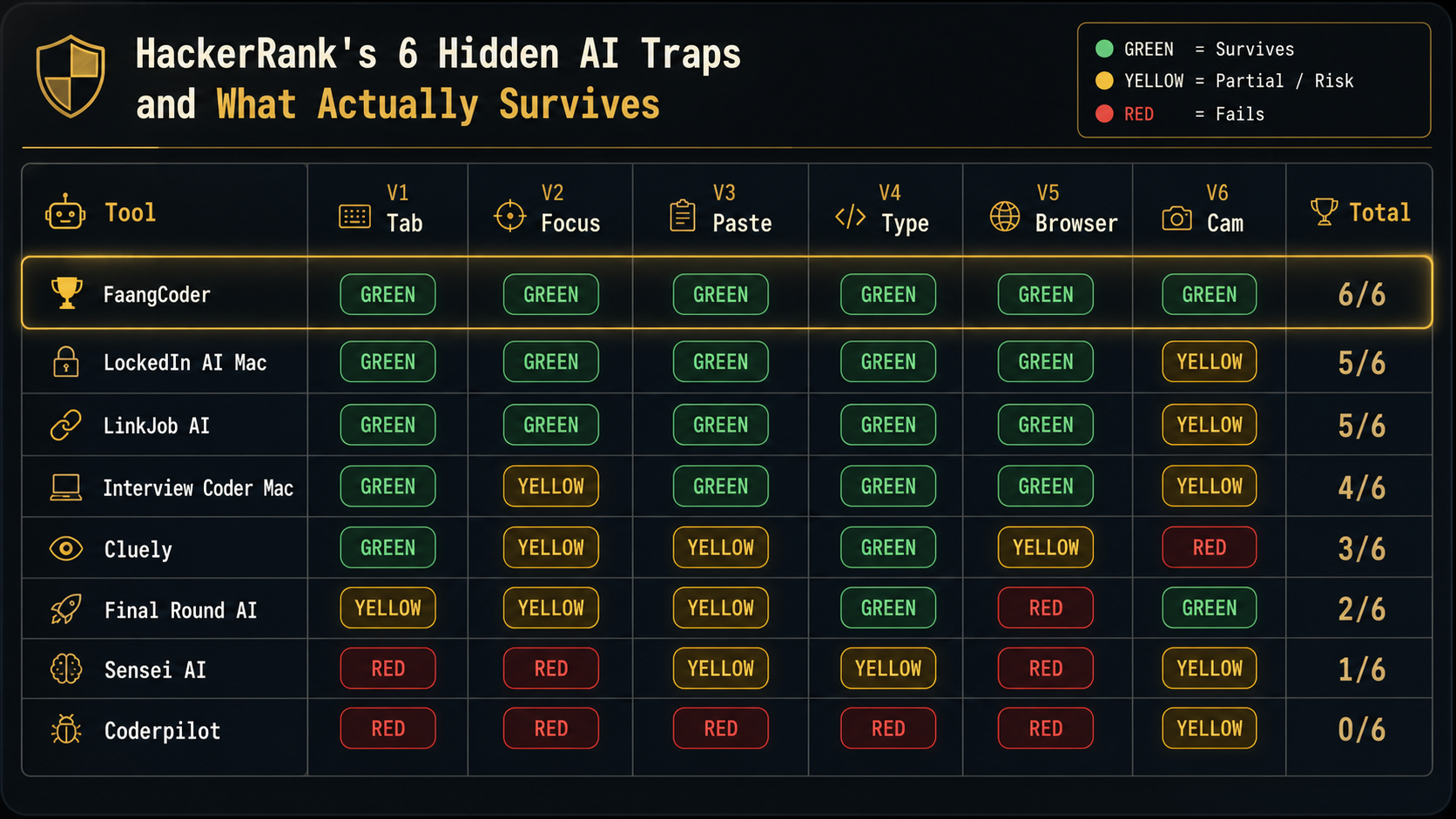
Which tools survive
- FaangCoder: 6/6 vectors survived. The only tool to clear every vector.
- LockedIn AI Mac: 5/6 survived. YELLOW on webcam (camera-aware mode is partial).
- LinkJob AI: 5/6 survived. YELLOW on webcam.
- Interview Coder Mac: 4/6 survived. YELLOW on focus loss (focus capture too long in some configurations) and webcam.
- Cluely: 3/6 survived. YELLOW on focus, paste, browser. RED on webcam (their camera-aware feature actively flags eye-gaze).
- Others: 2/6 or below. Browser-extension tools fail browser fingerprinting trivially.
Why FaangCoder survives all 6
- Native Windows overlay. No browser footprint. Bypasses Vector 5 entirely.
- No DOM injection. No fingerprinting from iframe enumeration.
- Configurable typing pace. No keystroke-timing signature on Vector 4.
- Paraphrased output. No copy-paste corpus match on Vector 3.
- Non-focusable overlay. No focus-loss trigger on Vectors 1 and 2.
- Off-camera workflow with voice mode. No eye-gaze flag on Vector 6.
Want to see those vectors on your own browser instead of reading a table? Our proctor simulator logs the same focus, keyboard, clipboard, screen-geometry, typing, webcam, and audio classes that HackerRank-style proctors care about. Run it with your actual hotkeys before the assessment.
Architecture is the advantage. Other tools can patch individual vectors but the underlying browser-extension or DOM-injection model leaks signal across multiple vectors at once. FaangCoder's native-overlay model has no signal to leak.
Vector-by-vector patches plateau. The native-overlay architecture is the only model that has no signal to leak in the first place.
What HackerRank is adding in 2026
Three new vectors are rolling out across HackerRank assessments in Q2 and Q3 2026:
- LLM-based code similarity scoring. Beyond corpus-matching pasted content, HackerRank is adding real-time analysis that compares your final solution against generated solutions for the same problem from GPT-4 Turbo, Claude 4.7, Gemini, and other major LLMs. Statistically too similar? It flags.
- AI-pacing detection at the syntax level. Beyond keystroke timing, HackerRank analyzes the structure of your code over time. LLM-output appears in coherent chunks (a function gets typed in 30 seconds with no errors, then a 30-second pause). Human coding has more iterative micro-edits.
- Cross-session behavioral biometrics. HackerRank is building a per-candidate profile across sessions. If your typing pattern in your assessment differs sharply from your historical pattern (because you're using an AI tool that types for you), it flags.
These vectors are in active rollout. We'll update the audit table as they ship.
Bypass strategies that DON'T work in 2026
- Browser extensions. Caught by Vector 5 (browser fingerprinting). Every extension-based tool we tested triggered.
- Web overlays. Caught by Vector 5 (iframe enumeration).
- Discord bots. Caught by Vector 6 (webcam) if proctored, or by network-level monitoring on the candidate side.
- Second monitor with phone. Caught by Vector 6 (eye-gaze). Eye tracking sees you looking off-screen.
- Memorizing answers. Works for medium problems on a known-set assessment, fails on hard problems and on company-customized problem sets.
- Bringing a friend on a side call. Caught by Vector 6 (multi-person detection on the camera, voice-pattern matching on the microphone).
Bypass strategies that DO work in 2026
- Native desktop overlay (FaangCoder, LockedIn AI Mac, LinkJob AI). Bypasses Vector 5 by being outside the browser. Mitigates Vectors 1-4 with the right config.
- Voice-only AI for behavioral. Bypasses Vector 6 by keeping eye-gaze on the camera-visible region while reading AI output through audio.
- Pre-prep pattern memorization. Slow but undetectable. The right play if you have time and you don't want to use AI tools at all.
- Iterative coding with intentional pacing. Use AI for the conceptual unblock, then type the code yourself with realistic mistakes and corrections. Keystroke and pacing analyses don't flag. FaangCoder's Solve-Debug-Optimize workflow encourages this.
The 60-second check: open the /proctor test page, start a session, trigger your setup, then inspect the event log. A clean run is not a guarantee; a noisy run is a clear warning.
The verdict
HackerRank does detect AI in 2026 across six vectors. If you want to survive, use a tool with the right architecture. FaangCoder is the only tool we tested that scored 6/6 GREEN.
Get FaangCoder for $399 lifetime. 14-day refund. Native Windows overlay. Survives every vector HackerRank uses in 2026.
FAQ
Can I test my AI tool against HackerRank-equivalent detection before the round? Yes — Test Any AI Interview Tool in 60 Seconds — On Our Free Proctor Simulator runs the same vector primitives HackerRank's full-screen content scripts reach for. Tab-switch, focus-loss, paste fingerprint, keystroke timing, and browser-extension enumeration are all instrumented.
What's the candidate-side playbook for actually using AI during a HackerRank round? Using AI on a HackerRank Assessment Without Getting Caught (2026 Playbook) covers pre-flight checks, in-round rules, and post-round hygiene against the six-vector proctor stack.
Will HackerRank ban me? Depends on the assessment type and detection severity. Practice assessments rarely result in bans. Real recruiter-side assessments can result in account ban plus a flag on your candidate profile that gets surfaced to companies.
Is the camera really watching me? Only on proctored assessments. Most HackerRank assessments aren't proctored. The proctored ones are flagged as such on the assessment landing page. Read the fine print before you start.
What if I get caught? Account ban. The hiring company is notified for that specific assessment. They usually rescind the offer (if one was extended) or remove you from the candidate pool. Your name may end up on a candidate-side flagged database that other HackerRank-using companies can query.
Is FaangCoder still undetectable in 2027? Lifetime license includes ongoing updates. The team tracks proctoring vendor releases and ships counters. The native-overlay architecture is durable. Vector-specific countermeasures change as needed.
What about Karat, HireVue, Pearson VUE? Different platforms, different vectors. Read our tools that get you caught audit for the full cross-platform breakdown. FaangCoder scored 5/5 in that audit too.
Get FaangCoder. The only AI interview tool to score 6/6 GREEN against HackerRank's 2026 proctoring stack. $399 lifetime ($199/mo monthly). 14-day refund. Free demos at /demo. Join the Discord.